One of the advantages I’ve always found in the Opera browser is its sidebar, specifically the ability to pin custom websites to it. Being able to add a site like Evernote, for example, allows you to quickly check notes in a floating panel without interrupting your main workflow or having to switch tabs.
It’s a feature that other browsers like Edge, Vivaldi, and Brave are slowly replicating… but I find they don’t quite work as well as in Opera.
With the browser’s switch to the “Opera One” version, this functionality has disappeared. The “Custom sites” section is no longer found in the sidebar settings, and we are limited to the sites or services they provide.
Fortunately, the option hasn’t been completely removed, but is instead hidden as an experimental feature (a “flag”). To get it back, the process is very simple:
Enable the Experimental “Flag”
- Open a new tab in Opera One.
- Type the following into the address bar:
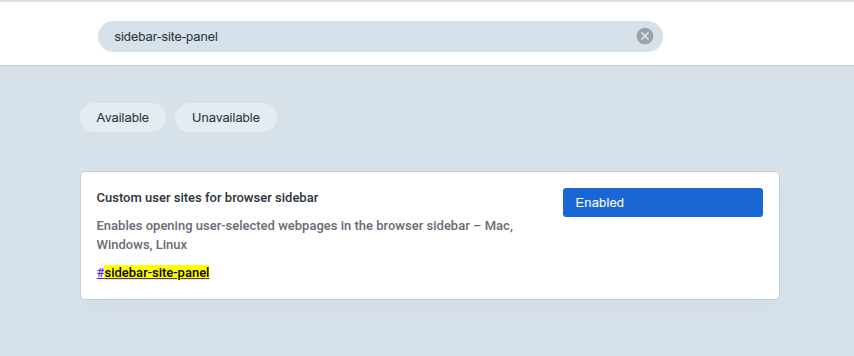
opera://flags - The experimental features menu will open. In the top search bar (“Search flags”), search for the flag we need:
sidebar-site-panel - The “Custom user sites for browser sidebar” option will appear. Change the setting from “Default” to “Enabled”.
- To apply the changes, you will need to restart the browser if it doesn’t prompt you automatically after enabling the flag.
Add Your Websites
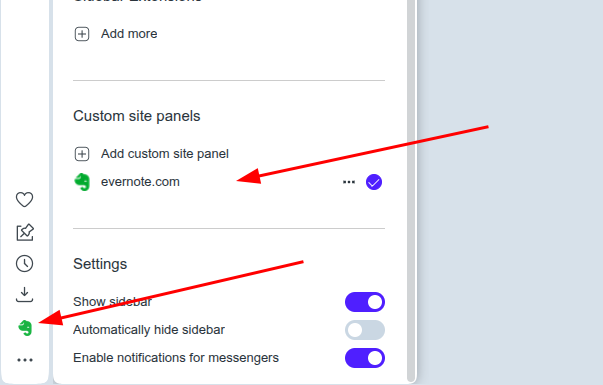
Once Opera has restarted, the option will be available again in the settings menu:
- Click the three-dot icon (…) located at the bottom of the sidebar.
- In the “Sidebar setup” panel, scroll down, almost to the very end of the options.
- The “Custom sites” section has reappeared.
- You can now click on “Add custom site” and enter the URL you need (e.g., https://evernote.com).
While this fixes the problem, it’s important to remember that, being an experimental “flag”, Opera could decide to remove it permanently in any future update. But, for the time being, this is the solution :) Let’s hope it lasts a long time.
PD: Banner image generated with AI.